
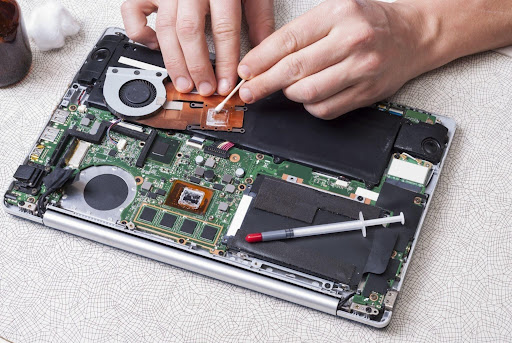
Hardware failure in laptops is a common issue affecting personal and professional users, often requiring structured diagnosis and expert technical support. Users frequently search for a Dell laptop service center near me or the best IT repair shop for quick solutions. Professional IT service providers follow a systematic process to identify, analyze, and resolve hardware problems. This approach ensures the root cause is fixed, not just the visible symptoms, ensuring stable and reliable system performance.
This guide explains in detail how hardware failure problems are resolved in structured IT service environments.
Understanding Laptop Hardware Failure
Laptop hardware failure refers to internal or physical component malfunctions that impact system performance or usability. Unlike software issues, hardware problems are linked to tangible components that may degrade over time or get damaged due to usage conditions.
Common hardware failure symptoms include:
- Laptop not turning on
- Frequent system crashes
- Overheating during usage
- Slow performance despite optimization
- Display flickering or a black screen
- Battery or charging issues
- Unexpected shutdowns
These issues require proper technical evaluation instead of basic troubleshooting methods.
Initial System Evaluation Process
The first step in resolving hardware issues is system evaluation. IT support teams start by understanding the symptoms and collecting basic system information.
This includes:
- Observing startup behavior
- Checking performance issues
- Reviewing error patterns
- Understanding user-reported problems
This step helps narrow down possible causes before running advanced diagnostics.
Detailed Hardware Diagnostic Testing
After initial evaluation, structured diagnostic testing is performed to identify faulty components.
This stage includes:
- RAM and memory testing
- Storage drive health analysis
- Motherboard circuit inspection
- Power supply and battery testing
- Cooling system evaluation
- Peripheral hardware checks
Advanced diagnostic tools are used to ensure accurate identification of issues. This step is critical because an incorrect diagnosis can lead to unnecessary repairs or replacements.
Root Cause Analysis of Failure
Once diagnostics are complete, technicians perform root cause analysis. Hardware issues are often interconnected, meaning one failure can trigger multiple symptoms.
For example:
- A failing hard drive can cause system freezing
- Overheating can reduce CPU performance
- Faulty RAM can lead to random crashes
Root cause analysis ensures the actual problem is identified instead of only treating surface-level symptoms.
Repair or Replacement Decision Process
After identifying the issue, IT technicians decide whether the hardware should be repaired or replaced.
This decision is based on:
- Level of hardware damage
- Cost-effectiveness of repair vs replacement
- Availability of compatible parts
- Long-term system stability
Minor issues may be repaired, while severely damaged components are replaced to ensure better performance and reliability.
Hardware Repair and System Restoration
Once the decision is made, the repair process begins. This may include replacing faulty components, fixing internal connections, or cleaning and recalibrating hardware systems.
After repair, system restoration is performed, which includes:
- Reassembling laptop components
- Ensuring hardware recognition
- Configuring system settings
- Restoring performance stability
This ensures that the laptop returns to a functional and stable state.
Post-Repair System Testing
After repairs are completed, systems undergo testing to ensure proper functionality and performance stability.
Testing includes:
- Boot time evaluation
- Stress testing under load
- Temperature monitoring
- Performance benchmarking
- Stability checks
This ensures that no hidden issues remain and the system is fully operational.
Importance of IT Infrastructure Support
In modern IT environments, hardware failure is not only about fixing a single device. Infrastructure support plays a major role in maintaining system stability.
IT service providers help with:
- Network stability during system failures
- Device integration across IT environments
- Reducing downtime in business operations
- Supporting multi-device systems
This ensures that even during hardware failures, overall IT operations continue smoothly.
Data Safety During Hardware Repairs
Data protection is a critical part of hardware repair processes. During diagnostics and repair, IT support teams ensure that system data is not lost or damaged.
Key safety practices include:
- Controlled handling of storage devices
- Structured repair workflows
- Minimizing system alterations during diagnostics
- Safe component testing methods
This ensures data integrity throughout the repair process.
IT Deployment and Recovery Support
In severe cases of hardware failure, full system recovery and deployment support is required. This is especially important for business users and professionals.
IT service providers assist with:
- Installing replacement hardware
- Reconfiguring system environments
- Restoring operating systems
- Ensuring system compatibility
This ensures fast recovery and minimal downtime, which is crucial for users searching for reliable support, such as a laptop service center or the best IT repair shop in Bangalore.
Asset Management and Lifecycle Monitoring
IT service providers also track hardware performance through asset management systems. This helps in predicting failures before they occur.
This includes:
- Monitoring device usage history
- Tracking hardware performance trends
- Identifying aging components
- Planning preventive maintenance
This proactive approach reduces unexpected breakdowns and improves long-term system reliability.
Common Hardware Issues Handled by IT Services
IT service environments regularly handle a wide range of hardware issues, including:
- System not powering on
- Screen and display failures
- Hard drive corruption
- RAM-related crashes
- Overheating issues
- Charging and battery failures
- Peripheral connectivity problems
Each issue is addressed using a structured diagnostic and repair workflow to ensure accuracy.
Why Structured IT Support Is Important
Structured IT support ensures that hardware failures are not just temporarily fixed but properly diagnosed and resolved. This reduces the chances of recurring issues and improves system performance.
It also helps users who search for solutions like a laptop service center or the best IT repair shop, where reliability, speed, and technical accuracy are essential.
A structured approach ensures:
- Faster problem resolution
- Accurate diagnosis
- Reduced system downtime
- Long-term performance stability
Conclusion
Laptop hardware failure needs structured IT support involving evaluation, diagnostics, repair, testing, and system restoration. Professional service providers focus on finding the root cause to ensure long-term stability and performance. This approach reduces downtime and improves reliability. It is especially helpful for users searching for solutions like Dell laptop service center near me for quick and accurate repair support.
For organizations requiring efficient technology management support, Fixora IT Services delivers structured IT support solutions focused on hardware troubleshooting, system maintenance, and IT infrastructure management. It provides IT support, system deployment, network management, and asset lifecycle tracking services. Its process ensures accurate diagnosis of technical issues, efficient system restoration, and improved operational stability. Through organized workflows and professional technical assistance, Fixora IT Services helps businesses maintain reliable and efficient IT environments.