
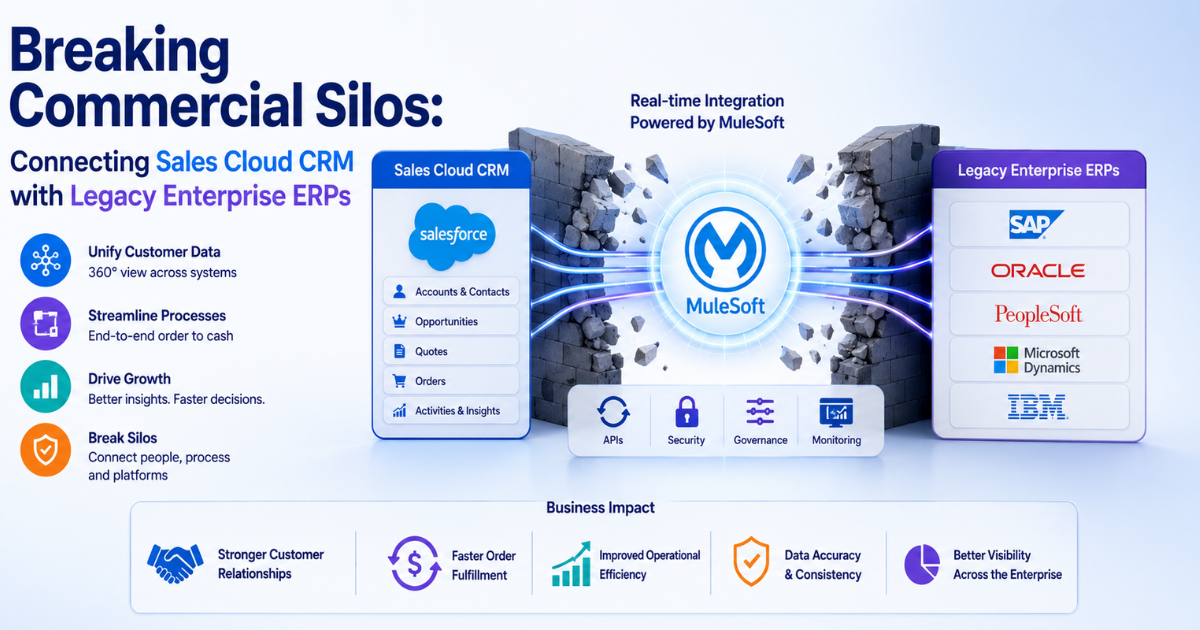
Modern businesses run into severe friction when they isolate customer relationship data from backend operational networks. Sales teams work primarily inside front-office systems like Salesforce to close new customer deals. Meanwhile, financial departments use legacy Enterprise Resource Planning (ERP) databases to manage inventory, fulfill shipping orders, and track corporate invoices.
When these core networks remain disconnected, operational blindness inevitably develops. Sales representatives accidentally sell out-of-stock items, while billing teams miss critical client contract updates.
Deploying professional Salesforce Sales Cloud Consulting enables organizations to bridge these infrastructure gaps. Strategic alignment converts isolated software nodes into a highly unified commercial system.
Technical Barriers of Legacy Architectures
Connecting modern cloud databases with decades-old on-premise technology creates complex engineering challenges. Legacy ERP engines often rely on structural programming methods that conflict with flexible cloud environments.
1. Data Model Mismatches
Salesforce organizes customer records using an object-oriented database schema. Conversely, older ERP installations use rigid relational tables optimized for physical transactional records. The following points highlight the most common structural data mismatches:
- The Account vs. Customer Master: Salesforce groups contact details under a flexible Account object. Legacy ERPs separate these records into strict billing, shipping, and corporate tax tables.
- The Opportunity vs. Order Entry: A Salesforce Opportunity captures early sales conversations. ERP engines do not recognize a transaction until it becomes a legally binding Order.
- The Product Catalog vs. Material Master: Cloud systems update product stock statuses instantly. Legacy ERP engines often handle inventory updates via slow, overnight batch processes.
2. Middleware Selection Patterns
Software engineers use middleware platforms to resolve these data format discrepancies. Professional Salesforce Sales Cloud Consulting Services assist infrastructure teams in selecting the right connection path based on specific business transaction volumes.
MuleSoft provides pre-built Salesforce connectors alongside native support for older ERP transmission protocols, making it an ideal choice for high-volume enterprise environments.
Designing Real-Time Synchronization Workflows
Enterprise software architectures must maintain perfect data balance across all active operational environments. Architects use specific patterns to synchronize core financial records without causing system errors.
The Quote-to-Cash Pipeline
The quote-to-cash process handles everything from configuring an initial sales proposal to recording final payment collection. A reliable data synchronization architecture requires following an orderly engineering path:
- Deal Closing: A sales representative shifts a Salesforce Opportunity status to Closed-Won.
- Validation: A platform Flow validates the opportunity records to confirm shipping and billing fields are complete.
- Transmission: The system sends a structured JSON payload to the middleware layer via an external Apex callout.
- ERP Ingestion: The middleware translates the payload into an RFC command to generate an order record inside the ERP.
- Confirmation: The ERP assigns a definitive order number and sends that reference key back to the Salesforce record.
Managing Enterprise Platform Performance
Running high-volume database integrations can quickly exhaust platform transaction capacities if left unmanaged. System architects must design integration paths that protect core platform stability.
1. Managing API Limit Capacities
Salesforce sets daily API call consumption caps to protect multi-tenant computing environments from overload. Poorly designed integration paths that send single records one by one can exhaust these limits within hours.
[Daily API Consumption Monitoring]
0% – 74%: Healthy Range (Standard system background tasks)
75% – 89%: Alert Threshold (High sync volume or unoptimized code blocks)
90% – 100%: System Risk (Data queues freeze, blocking external traffic)
Engineers resolve this bottleneck by using the Salesforce Bulk API 2.0. This framework allows teams to group thousands of records into single data packages, reducing overall API consumption by up to 90%.
2. Data Virtualization Strategies
Moving millions of old financial records into a live CRM database wastes expensive storage space. Instead, consultants use Salesforce Connect to display external ERP tables via real-time web services. This configuration allows sales representatives to view live invoice data inside the CRM without saving duplicate copies of those records to local storage.
Quantifiable Performance Impacts
Linking backend operational applications with front-office sales networks delivers verifiable improvements across all primary enterprise performance metrics.
1. Reducing Order Error Frequency
Manual data entry remains a major source of corporate transcription errors. According to international supply chain research by the APQC, human typographical errors disrupt up to 12% of manually processed purchase orders.
Automated platform integrations eliminate manual re-typing tasks completely. This automation drops order processing error rates below 0.5%, saving companies thousands of dollars in annual inventory replacement costs.
2. Accelerating Cash Collection Cycles
When field staff cannot access account credit limits or unpaid invoice lists, payment cycles slow down. Connecting backend finance engines to Sales Cloud visibility structures cuts Days Sales Outstanding (DSO) by an average of 18%.
The comparative data tables below illustrate the direct performance improvements gained by replacing disconnected systems with unified consulted environments:
| Commercial Data Category | Disconnected Legacy Setup | Connected Sales Cloud Architecture |
| Inventory Status Checks | Manual Phone/Email Queries | Live Salesforce Connect OData Panels |
| Order Record Insertion | Manual Double-Entry Processing | Automated Asynchronous Apex Triggers |
| Account Credit Checks | Weekly Accounting Reports | Real-Time Platform Status Flags |
| Shipping Tracking View | Offline External Freight Portals | Native Custom Object Synchronization |
Structured System Deployment Steps
Building a reliable cross-platform data integration requires following an orderly, step-by-step development process. This sequence minimizes operational risk during system updates.
1. Mapping Enterprise Master Records
Architects must first clean existing customer records across all active databases. The engineering team selects a single system to act as the primary master database for each data field type. For example, Sales Cloud manages active customer addresses, while the ERP acts as the master authority for product pricing lists.
2. Creating Sandbox Testing Zones
Engineers isolate development work by building identical sandbox environments for both Salesforce and the ERP engine. Testing custom integration code in these isolated zones prevents developers from altering live customer orders or corrupting active financial pipelines.
3. Executing Error Handling Audits
Integration developers must build comprehensive error handling routines into their middleware rules. The system must log every network failure instantly:
[System Integration Error Categorization]
Timeout Errors -> Retry connection automatically every 15 minutes.
Payload Format Errors -> Route to the IT admin queue for manual review.
Authentication Failures -> Freeze the sync queue and alert security teams.
Clear error logging patterns prevent network connection drops from corrupting record states or losing vital transaction data.
4. Deploying Live Pilot Systems
The project team rolls out the completed integration framework to a small group of users first. Monitoring this initial group allows engineers to resolve performance bottlenecks before launching the system across the entire global organization.
Resolving Common Integration Pitfalls
Enterprise engineering teams frequently face technical challenges during initial system integration deployments.
1. Mitigating Race Conditions
A race condition occurs when two distinct systems try to modify the same customer record at the exact same time. For example, if a sales representative updates an account address in Sales Cloud while an accounting clerk modifies the same billing record in the ERP, the systems can lock each other out or overwrite valid data.
- Mitigation Strategy: Salesforce Sales Cloud Consulting Services eliminate this issue by enforcing strict timestamp validation rules within the middleware layer. The system compares modification records down to the millisecond, allowing the latest change to update both platforms safely.
2. Eliminating Custom Code Bloat
Writing bespoke Apex integration scripts for every unique ERP data table creates a fragile, high-maintenance architecture that breaks easily during standard platform updates.
- Mitigation Strategy: Platform teams should use configurable, low-code integration utilities like Salesforce Flow HTTP Callouts wherever possible. This modern design pattern minimizes custom code dependencies, ensuring the integration remains stable and easy to update over time.
Long-Term Integration Management
Enterprise integrations require ongoing monitoring and structured maintenance to remain accurate as business needs shift.
1. Scheduling Data Balance Audits
Data configurations drift over time due to unexpected network disconnects or manual overrides. Technical teams should schedule automated data audits every weekend to compare total record counts between Sales Cloud and the ERP, allowing them to fix discrepancies before they impact operations.
2. Managing Version Upgrade Releases
Salesforce rolls out platform upgrades three times a year, while ERP providers issue periodic security patches. Integration teams must evaluate these updates inside their sandbox testing environments weeks before the live launch, ensuring data connections remain stable across both systems.
Core Summary of System Integration
Isolating front-office sales pipelines from backend financial engines slows down company growth and introduces unnecessary operational risk. Relying on manual data entry wastes valuable staff time and leads to expensive order errors. Salesforce Sales Cloud Consulting provides the technical framework needed to link these separate corporate databases into a reliable, automated platform.
By utilizing high-speed Bulk APIs, implementing automated quote-to-cash workflows, and using data virtualization tools, companies can bridge their technology gaps safely. This modern integration pattern improves data accuracy, accelerates transaction cycles, and helps global businesses get maximum value out of their enterprise software investments.
Conclusion
Relying on disconnected data networks introduces severe visibility risks into modern commercial workflows. Manual data management methods create internal bottlenecks that frustrate sales teams and damage the customer experience. Enterprises must treat system integration as a foundational operational strategy rather than a secondary IT maintenance task.Partnering with certified Salesforce Sales Cloud Consulting Services gives organizations the structural guidance needed to build dependable cross-cloud architectures. This methodology ensures data moves smoothly across the enterprise while protecting sensitive financial records. Establishing clear master data rules, robust error logging routines, and proactive system monitors allows modern businesses to eliminate commercial silos and build a scalable framework for long-term growth.
