Quick answer: The DLS 26 Card Creator is a feature in Dream League Soccer 2026 that lets players design and customize their own player cards with unique stats, visuals, and attributes. It’s available through in-game tools and third-party platforms, and it’s one of the most talked-about additions to the DLS 26 experience.
Dream League Soccer 2026 has raised the bar for mobile football gaming — and the Card Creator is one of the biggest reasons fans are buzzing. Whether you want to build a fantasy squad with custom-rated players or just see what your favorite footballer looks like as a gold elite card, the Card Creator puts that power directly in your hands.
But what exactly is the DLS 26 Card Creator? How does it work? And what can you actually do with the cards you create? This guide covers everything — from the basics of card design to tips for getting the most out of the feature.
What Is the DLS 26 Card Creator?
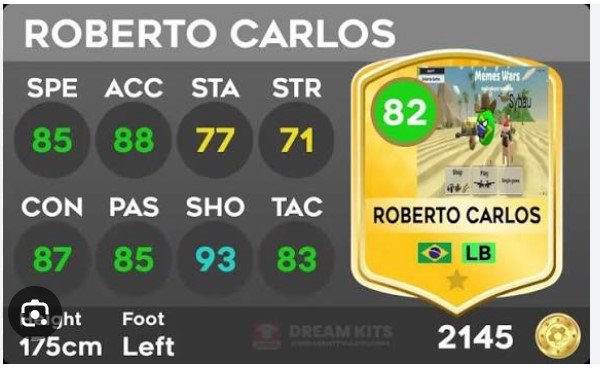
The DLS 26 Card Creator is a customization tool that allows Dream League Soccer 2026 players to generate personalized player cards. These cards mimic the visual style of official in-game cards, complete with player ratings, position labels, stat breakdowns, and card tier designs (such as bronze, silver, gold, and elite variations).
Players use the Card Creator for a range of purposes:
- Fantasy squad building — Creating dream team cards with custom stats for players who aren’t in the official game
- Content creation — Producing card reveal videos and social media posts
- Community challenges — Sharing custom-rated squads with other DLS fans online
- Fun and personalization — Making cards of themselves, friends, or fictional players
The tool is accessible both within certain in-game menus and through popular third-party DLS card generator websites, which replicate the official card aesthetic with a high degree of accuracy.
How Does the DLS 26 Card Creator Work?
Choosing Your Card Template
The first step in any card creation is selecting a template. DLS 26 uses a tiered card system, and the Card Creator reflects this. Common card tiers include:
- Bronze — For lower-rated players (typically below 70 OVR)
- Silver — Mid-tier cards (70–79 OVR)
- Gold — High-quality cards (80–89 OVR)
- Elite / Special — Top-tier and event-specific cards (90+ OVR)
Special edition templates — such as TOTW (Team of the Week), TOTS (Team of the Season), or event cards — are also available on many third-party card creator platforms, giving your custom cards a premium look.
Adding Player Information
Once you’ve selected a template, you’ll input the player’s details:
- Name — First name, last name, or nickname
- Overall rating — The number displayed prominently on the card face
- Position — ST, CAM, CB, GK, etc.
- Nation and club — Represented by flag and badge icons
- Individual stats — PAC, SHO, PAS, DRI, DEF, and PHY (mirroring the six-stat format popularized by FIFA/EA FC card designs)
Some advanced Card Creator tools also let you upload a custom player photo, which gets cropped and rendered in the style of an official DLS player image.
Exporting and Sharing Your Card
After finalizing the design, you can download the card as a high-resolution image file. From there, most creators share their cards on:
- YouTube — Card reveal and pack opening videos
- TikTok — Short-form card showcase content
- Reddit — Communities like r/DreamLeagueSoccer
- Discord — Private DLS fan servers and squad-building challenges
What Makes the DLS 26 Card Creator Different From Previous Versions?
DLS 26 builds on the visual identity of its predecessors while introducing sharper card aesthetics and more detailed stat displays. Compared to DLS 25, the card designs in DLS 26 feature:
- Refined typography — Cleaner fonts for player names and ratings
- Updated club and national team badges — Reflecting real-world kit and badge changes
- New special card templates — Including limited-time event cards tied to in-game seasons
- Higher image resolution — Cards look crisper on modern mobile displays
Third-party Card Creator platforms have quickly updated their tools to match the DLS 26 aesthetic, meaning fans don’t have to wait for official updates to start creating cards in the new style.
Tips for Creating High-Quality DLS 26 Cards
Use Real Reference Stats for Realism
If you’re creating a card for a real player who isn’t currently in DLS 26, look up their stats from comparable football games or official performance data. Assigning realistic ratings makes your card more credible and more engaging for the community.
Match the Card Tier to the Rating
A common mistake new users make is putting a 95 OVR rating on a bronze card template. Keep the card tier consistent with the overall rating — it makes the card look intentional rather than careless.
Pay Attention to Image Cropping
If the tool allows custom photos, choose a high-resolution image with a clear background. Poor image quality is the fastest way to make an otherwise well-designed card look amateur.
Use Consistent Stat Weighting
Don’t max out every individual stat just because you want a high overall rating. Balanced cards — where a striker has high PAC and SHO but lower DEF — look far more authentic and will resonate better with experienced DLS players.
Where Can You Find a DLS 26 Card Creator Tool?
Several platforms offer DLS-style card generators online. When searching for one, look for tools that:
- Support DLS 26 card templates (not just older DLS versions)
- Allow custom player images
- Offer special/event card designs
- Let you download cards in PNG format at high resolution
Search terms like “DLS 26 card creator online” or “Dream League Soccer 2026 card generator” will surface the most up-to-date options. Always use reputable platforms — avoid any sites that ask for your DLS account credentials, as these are likely scams.
The DLS 26 Card Creator and the Content Creator Community
The Card Creator has become a cornerstone of the DLS content ecosystem. On YouTube, card reveal videos — where creators dramatically “reveal” a newly designed card with on-screen effects and commentary — regularly attract tens of thousands of views. On TikTok, custom card showcases are a reliable format for DLS creators to grow their audiences.
This has created a feedback loop: the more creative and polished the card designs become, the more viewers engage, which in turn pushes creators to get better at using the Card Creator tools. For aspiring DLS content creators, mastering the Card Creator is one of the fastest ways to build a niche audience.
Build Your Dream Squad, One Card at a Time
The DLS 26 Card Creator gives players something that football games have always teased but rarely fully delivered — true creative ownership. You’re not just playing the game; you’re shaping it, customizing it, and sharing it with a global community of fans who are just as passionate about the sport as you are.
Start with one card. Experiment with the templates, get your stats right, and share it with the DLS community. You might be surprised how much traction a well-crafted custom card can generate.
Frequently Asked Questions
What is the DLS 26 Card Creator used for?
The DLS 26 Card Creator is used to design custom Dream League Soccer 2026 player cards. Players use it to build fantasy squads, create content for YouTube and TikTok, and participate in community card-sharing challenges.
Is the DLS 26 Card Creator free to use?
Most third-party DLS 26 Card Creator tools are free to use online. Some platforms may offer premium features — such as additional card templates or higher-resolution exports — behind a paywall, but the core card creation functionality is typically available at no cost.
Can I use custom player photos in the DLS 26 Card Creator?
Yes, many DLS 26 Card Creator platforms allow you to upload a custom player image. For the best results, use a high-resolution photo with a plain or easily removable background.
Do DLS 26 custom cards work in the actual game?
No. Cards created using third-party Card Creator tools are image files only — they cannot be imported into Dream League Soccer 2026 or used in actual gameplay. They are purely for visual and content creation purposes.
What stats does a DLS 26 card include?
A standard DLS 26 player card displays six core stats: pace (PAC), shooting (SHO), passing (PAS), dribbling (DRI), defending (DEF), and physicality (PHY), along with the player’s overall rating, position, nationality, and club.
Where can I share my DLS 26 custom cards?
Popular platforms for sharing DLS 26 custom cards include YouTube, TikTok, Reddit (r/DreamLeagueSoccer), and Discord servers dedicated to DLS fan communities.